

A Comprehensive Guide to SAP SuccessFactors Landscape

A Comprehensive Guide to SAP SuccessFactors Landscape

SAP SuccessFactors HCM

Published: March 7, 2023

Banner

SuccessFactors is a crucial SAP product suite that helps in offering cloud-based solutions for managing business alignment, recruitment, people performance, learning activities, and employees central for organizations of all sizes and scales. The solution by SAP product suite is available for over 60 industry verticals. SAP SuccessFactors platform serves to be a cloud-based HCM solution while being developed on the SaaS or Software as a Service model.

SuccessFactors is a company that was introduced in 2001 in the form of a cloud-based SAP HCM solution provider. Eventually, SuccessFactors was acquired by SAP in 2011.
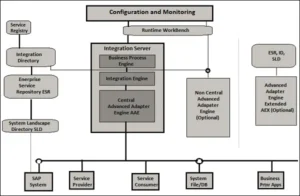
Configuration-and-Monitoring-of-SuccessFactors

Source: https://www.tutorialspoint.com/

What are the Core Features of SAP SuccessFactors?

Some of the core features of SAP SuccessFactors that can be helpful for your business are:

  • HR transactions
  • Recruitment
  • Time-off
  • Position management
  • Transfers and changes
  • Learning and development
  • Auditing, reporting, and compliance
  • Payroll timesheets
  • Integration and extensibility

Software as a Service (SaaS)

SAP SuccessFactors is a cloud-based HCM software solution that has been designed in the form of a SaaS or Software as a Service model. SaaS is also known as the on-demand software solution wherein the software has been licensed on a subscription basis while being hosted centrally.

SaaS has become one of the most common delivery models for a number of business applications -including messaging and office software, DBMS software, CAD software, payroll processing software, CRM or Customer Relationship Management, accounting, collaboration, virtualization, and so more. Some important pointers to consider are:

  • In Software as a Service, application, and software data is hosted on some remote cloud-based environment. Therefore, it can be easily accessed on demand from any given location with the help of secured login credentials.
  • SaaS software like SAP SuccessFactors serves to be a multi-tenant platform. Therefore, it allows several instances of the software to be easily accessed while being on the same application version.
  • With SaaS solutions, users have the option of selecting functionality and features to be used in the standard solution along with regular releases that are launched by the vendor.
  • SaaS solution has been based on the multi-tenant architecture wherein a single configuration might be applied for all the customers or tenants. To deliver ample scalability, you can go ahead with installing the solution on multiple devices or locations.

Here is the homepage of SAP SuccessFactors. At its top, you will come across the search option wherein you are capable of performing an active search. Moreover, you will also come across the To-Do section for quickly accessing day-to-day tasks. There is also the presence of a dedicated Help & Tutorial tab that can be used for seeking any help with respect to SAP SuccessFactors.
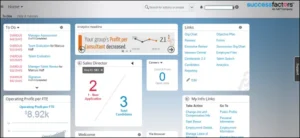
Homepage-of-SAP-SuccessFactors

Source: https://www.tutorialspoint.com/

What are the Benefits of SAP SuccessFactors Cloud Solutions?

There are several benefits of a cloud-based environment like SAP SuccessFactors, unlike on-premise systems. Some for you to consider are:

Cost-effective Solutions

  • Capital Expenditure: This concept is involved in the existing IT infrastructure for promoting on-premise solutions. The overall costs of IT infrastructure can be quite higher.
  • Operational Expenditure: In a dedicated cloud-based solution, there is no requirement for capital expenditure. Therefore, it helps in saving a good amount for procuring the hardware platform. In a cloud-based environment, the hardware remains shared as well as procured by a reliable cloud service provider. Therefore, the company is expected to bear only the operational expenses like maintenance of the tenants and users.

Ownership

  • Subscription: In a cloud environment, you are expected to subscribe to a cloud vendor.
  • Company-owned: An on-premise solution might be owned and operated by a company.

What are the Add-On Features of SAP SuccessFactors Integration?

Integration add-on features for SAP SuccessFactors HCM and SAP ERP HCM enable you to integrate data between subsequent environments related to the respective organizational structure, qualification data, compensation, and organizational data.

  • Compensation Data: You can think of supporting the compensation process on Business Execution. It can be done by transferring relevant data from the compensation SAP ERP HCM platform to the BizX platform of SuccessFactors. You can also go ahead with transferring planned compensation-specific data from the Business Execution platform of SuccessFactors to SAP ERP HCM. This data can be eventually imported into the payroll cycle of the respective HCM suite.
  • Employee-centric Data: SAP SuccessFactors integration add-on enables you to transfer organizational as well as employee data from the existing SAP ERP HCM to SAP SuccessFactors. At the same time, you are able to manage the talent management processes on SAP SuccessFactors through BizX or Business Execution.
  • Evaluation Data: It is possible to manage workforce planning as well as analytics by ensuring the transfer of data from SAP ERP HCM to the cloud-based environment of SuccessFactors.

Understanding SAP SuccessFactors Middleware and Landscape

As an integral part of the integration mechanism with SAP SuccessFactors, two types of landscapes exist:

  • SAP PI serving as part of SAP ERP HCM -on-premise landscape
  • SAP HCI serves to be a separate component from the suite of SAP ERP HCM

The integration add-on by SAP SuccessFactors helps in supporting the entire integration scenario with the help of middleware. It is possible to leverage SAP PI or Process Integration or SAP HCI or HANA Cloud Integration for ensuring the transfer of content in the form of middleware. When you make use of SAP PI or Process Integration in the form of middleware, embedding of integration add-on takes place. Moreover, the integration connectivity add-on also forms an integral part of the suite of on-premise SAP ERP HCM.

When you make use of SAP HCI or HANA Cloud Integration in the form of middleware, it is regarded as a portion of a different environment from the suite of SAP ERP HCM.

Understanding SAP SuccessFactors HCM Suite

SAP SuccessFactors HCM suite is available as a web-based platform or tool. The platform requires a relevant internet connection along with a dedicated system with the respective configurations:

Desktop Browser:

  • Google Chrome
  • Apple Safari 6, 7, 8
  • Microsoft Edge
  • Mozilla Firefox
  • Microsoft Internet Explorer

Mobile Browser:

  • Google Chrome for Android
  • Google Android 4.1+ as the default browser
  • Apple Safari for iOS 8.0+

Oracle Java Runtime Environment:

  • On-premise customers are given the option of electing to need JRE for ensuring content tracking in a cross-domain solution
  • 1.7 for PRD or Plateau Report Designer 4.4.1
  • 1.6 or higher for using audio or video recording

Operating System

  • Microsoft Windows 7
  • Microsoft Windows Vista
  • Microsoft Windows 8+
  • Apple Mac OS along with Lion (10.7) or higher

What are some of the other configurations?

  • Network Bandwidth: The suggested connection speed is around 300-400 kbps
  • Screen Resolution: The expected screen resolution should be XGA 1024X768 in high color or even higher
  • Adobe Flash Player: Version 10 or even higher
  • Size of Cache: Recommended 250MB of cache size

What is SAP SuccessFactors Landscape?
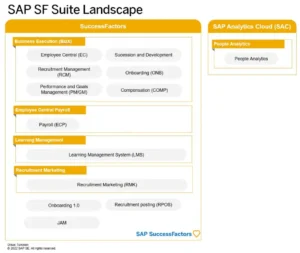
SAP-SF-Suite-Landscape

Source: https://blogs.sap.com/

BizX or Business Executive serves to be the core platform. Workflows and people profiles are regarded as platform-centric services. RMK, LMS, and ECP are all regarded as independent tenants while being a major part of the SuccessFactors Suite.

It is important to understand the core landscape and functioning of the SAP SuccessFactors solution. You can take help from a reliable SAP consulting company.

Highlights on New Emarsys Innovations to Empower Marketers

A Comprehensive Guide to SAP SuccessFactors Landscape

SAP ERP

Published: February 21, 2023

Banner

SuccessFactors is a crucial SAP product suite that helps in offering cloud-based solutions for managing business alignment, recruitment, people performance, learning activities, and employees central for organizations of all sizes and scales. The solution by SAP product suite is available for over 60 industry verticals. SAP SuccessFactors platform serves to be a cloud-based HCM solution while being developed on the SaaS or Software as a Service model.

SuccessFactors is a company that was introduced in 2001 in the form of a cloud-based SAP HCM solution provider. Eventually, SuccessFactors was acquired by SAP in 2011.

Configuration-and-Monitoring-of-SuccessFactors

Source: https://www.tutorialspoint.com/

What are the Core Features of SAP SuccessFactors?

Some of the core features of SAP SuccessFactors that can be helpful for your business are:

  • HR transactions
  • Recruitment
  • Time-off
  • Position management
  • Transfers and changes
  • Learning and development
  • Auditing, reporting, and compliance
  • Payroll timesheets
  • Integration and extensibility

Software as a Service (SaaS)

SAP SuccessFactors is a cloud-based HCM software solution that has been designed in the form of a SaaS or Software as a Service model. SaaS is also known as the on-demand software solution wherein the software has been licensed on a subscription basis while being hosted centrally.

SaaS has become one of the most common delivery models for a number of business applications -including messaging and office software, DBMS software, CAD software, payroll processing software, CRM or Customer Relationship Management, accounting, collaboration, virtualization, and so more. Some important pointers to consider are:

  • In Software as a Service, application, and software data is hosted on some remote cloud-based environment. Therefore, it can be easily accessed on demand from any given location with the help of secured login credentials.
  • SaaS software like SAP SuccessFactors serves to be a multi-tenant platform. Therefore, it allows several instances of the software to be easily accessed while being on the same application version.
  • With SaaS solutions, users have the option of selecting functionality and features to be used in the standard solution along with regular releases that are launched by the vendor.
  • SaaS solution has been based on the multi-tenant architecture wherein a single configuration might be applied for all the customers or tenants. To deliver ample scalability, you can go ahead with installing the solution on multiple devices or locations.

Here is the homepage of SAP SuccessFactors. At its top, you will come across the search option wherein you are capable of performing an active search. Moreover, you will also come across the To-Do section for quickly accessing day-to-day tasks. There is also the presence of a dedicated Help & Tutorial tab that can be used for seeking any help with respect to SAP SuccessFactors.

Homepage-of-SAP-SuccessFactors

Source: https://www.tutorialspoint.com/

What are the Benefits of SAP SuccessFactors Cloud Solutions?

There are several benefits of a cloud-based environment like SAP SuccessFactors, unlike on-premise systems. Some for you to consider are:

Cost-effective Solutions

  • Capital Expenditure: This concept is involved in the existing IT infrastructure for promoting on-premise solutions. The overall costs of IT infrastructure can be quite higher.
  • Operational Expenditure: In a dedicated cloud-based solution, there is no requirement for capital expenditure. Therefore, it helps in saving a good amount for procuring the hardware platform. In a cloud-based environment, the hardware remains shared as well as procured by a reliable cloud service provider. Therefore, the company is expected to bear only the operational expenses like maintenance of the tenants and users.

Ownership

  • Subscription: In a cloud environment, you are expected to subscribe to a cloud vendor.
  • Company-owned: An on-premise solution might be owned and operated by a company.

What are the Add-On Features of SAP SuccessFactors Integration?

Integration add-on features for SAP SuccessFactors HCM and SAP ERP HCM enable you to integrate data between subsequent environments related to the respective organizational structure, qualification data, compensation, and organizational data.

  • Compensation Data: You can think of supporting the compensation process on Business Execution. It can be done by transferring relevant data from the compensation SAP ERP HCM platform to the BizX platform of SuccessFactors. You can also go ahead with transferring planned compensation-specific data from the Business Execution platform of SuccessFactors to SAP ERP HCM. This data can be eventually imported into the payroll cycle of the respective HCM suite.
  • Employee-centric Data: SAP SuccessFactors integration add-on enables you to transfer organizational as well as employee data from the existing SAP ERP HCM to SAP SuccessFactors. At the same time, you are able to manage the talent management processes on SAP SuccessFactors through BizX or Business Execution.
  • Evaluation Data: It is possible to manage workforce planning as well as analytics by ensuring the transfer of data from SAP ERP HCM to the cloud-based environment of SuccessFactors.

Understanding SAP SuccessFactors Middleware and Landscape

As an integral part of the integration mechanism with SAP SuccessFactors, two types of landscapes exist:

  • SAP PI serving as part of SAP ERP HCM -on-premise landscape
  • SAP HCI serves to be a separate component from the suite of SAP ERP HCM

The integration add-on by SAP SuccessFactors helps in supporting the entire integration scenario with the help of middleware. It is possible to leverage SAP PI or Process Integration or SAP HCI or HANA Cloud Integration for ensuring the transfer of content in the form of middleware. When you make use of SAP PI or Process Integration in the form of middleware, embedding of integration add-on takes place. Moreover, the integration connectivity add-on also forms an integral part of the suite of on-premise SAP ERP HCM.

When you make use of SAP HCI or HANA Cloud Integration in the form of middleware, it is regarded as a portion of a different environment from the suite of SAP ERP HCM.

Understanding SAP SuccessFactors HCM Suite

SAP SuccessFactors HCM suite is available as a web-based platform or tool. The platform requires a relevant internet connection along with a dedicated system with the respective configurations:

Desktop Browser:

  • Google Chrome
  • Apple Safari 6, 7, 8
  • Microsoft Edge
  • Mozilla Firefox
  • Microsoft Internet Explorer

Mobile Browser:

  • Google Chrome for Android
  • Google Android 4.1+ as the default browser
  • Apple Safari for iOS 8.0+

Oracle Java Runtime Environment:

  • On-premise customers are given the option of electing to need JRE for ensuring content tracking in a cross-domain solution
  • 1.7 for PRD or Plateau Report Designer 4.4.1
  • 1.6 or higher for using audio or video recording

Operating System

  • Microsoft Windows 7
  • Microsoft Windows Vista
  • Microsoft Windows 8+
  • Apple Mac OS along with Lion (10.7) or higher

What are some of the other configurations?

  • Network Bandwidth: The suggested connection speed is around 300-400 kbps
  • Screen Resolution: The expected screen resolution should be XGA 1024X768 in high color or even higher
  • Adobe Flash Player: Version 10 or even higher
  • Size of Cache: Recommended 250MB of cache size

What is SAP SuccessFactors Landscape?

SAP-SF-Suite-Landscape

Source: https://blogs.sap.com/

BizX or Business Executive serves to be the core platform. Workflows and people profiles are regarded as platform-centric services. RMK, LMS, and ECP are all regarded as independent tenants while being a major part of the SuccessFactors Suite.

It is important to understand the core landscape and functioning of the SAP SuccessFactors solution. You can take help from a reliable SAP consulting company.

Conclusion

Emarsys is a place of innovation for business owners. With new updates and features every now and then, it’s only a step away from becoming the perfect software module for users all around. So, has your business leveraged SAP Emarsys yet?

Profile

Vikas Chopra

Practice Head SAP S/4HANA

Copy link

SAP Solution Architect with 23+ years in logistics and SCM. Expert in SAP S/4HANA with hands-on experience in global rollouts, upgrades, and enterprise solution delivery.

FAQs and User Experience Insights for RISE with SAP

A Comprehensive Guide to SAP SuccessFactors Landscape

SAP ERP

Published: February 15, 2023

Banner

SuccessFactors is a crucial SAP product suite that helps in offering cloud-based solutions for managing business alignment, recruitment, people performance, learning activities, and employees central for organizations of all sizes and scales. The solution by SAP product suite is available for over 60 industry verticals. SAP SuccessFactors platform serves to be a cloud-based HCM solution while being developed on the SaaS or Software as a Service model.

SuccessFactors is a company that was introduced in 2001 in the form of a cloud-based SAP HCM solution provider. Eventually, SuccessFactors was acquired by SAP in 2011.

Configuration-and-Monitoring-of-SuccessFactors

Source: https://www.tutorialspoint.com/

What are the Core Features of SAP SuccessFactors?

Some of the core features of SAP SuccessFactors that can be helpful for your business are:

  • HR transactions
  • Recruitment
  • Time-off
  • Position management
  • Transfers and changes
  • Learning and development
  • Auditing, reporting, and compliance
  • Payroll timesheets
  • Integration and extensibility

Software as a Service (SaaS)

SAP SuccessFactors is a cloud-based HCM software solution that has been designed in the form of a SaaS or Software as a Service model. SaaS is also known as the on-demand software solution wherein the software has been licensed on a subscription basis while being hosted centrally.

SaaS has become one of the most common delivery models for a number of business applications -including messaging and office software, DBMS software, CAD software, payroll processing software, CRM or Customer Relationship Management, accounting, collaboration, virtualization, and so more. Some important pointers to consider are:

  • In Software as a Service, application, and software data is hosted on some remote cloud-based environment. Therefore, it can be easily accessed on demand from any given location with the help of secured login credentials.
  • SaaS software like SAP SuccessFactors serves to be a multi-tenant platform. Therefore, it allows several instances of the software to be easily accessed while being on the same application version.
  • With SaaS solutions, users have the option of selecting functionality and features to be used in the standard solution along with regular releases that are launched by the vendor.
  • SaaS solution has been based on the multi-tenant architecture wherein a single configuration might be applied for all the customers or tenants. To deliver ample scalability, you can go ahead with installing the solution on multiple devices or locations.

Here is the homepage of SAP SuccessFactors. At its top, you will come across the search option wherein you are capable of performing an active search. Moreover, you will also come across the To-Do section for quickly accessing day-to-day tasks. There is also the presence of a dedicated Help & Tutorial tab that can be used for seeking any help with respect to SAP SuccessFactors.

Homepage-of-SAP-SuccessFactors

Source: https://www.tutorialspoint.com/

What are the Benefits of SAP SuccessFactors Cloud Solutions?

There are several benefits of a cloud-based environment like SAP SuccessFactors, unlike on-premise systems. Some for you to consider are:

Cost-effective Solutions

  • Capital Expenditure: This concept is involved in the existing IT infrastructure for promoting on-premise solutions. The overall costs of IT infrastructure can be quite higher.
  • Operational Expenditure: In a dedicated cloud-based solution, there is no requirement for capital expenditure. Therefore, it helps in saving a good amount for procuring the hardware platform. In a cloud-based environment, the hardware remains shared as well as procured by a reliable cloud service provider. Therefore, the company is expected to bear only the operational expenses like maintenance of the tenants and users.

Ownership

  • Subscription: In a cloud environment, you are expected to subscribe to a cloud vendor.
  • Company-owned: An on-premise solution might be owned and operated by a company.

What are the Add-On Features of SAP SuccessFactors Integration?

Integration add-on features for SAP SuccessFactors HCM and SAP ERP HCM enable you to integrate data between subsequent environments related to the respective organizational structure, qualification data, compensation, and organizational data.

  • Compensation Data: You can think of supporting the compensation process on Business Execution. It can be done by transferring relevant data from the compensation SAP ERP HCM platform to the BizX platform of SuccessFactors. You can also go ahead with transferring planned compensation-specific data from the Business Execution platform of SuccessFactors to SAP ERP HCM. This data can be eventually imported into the payroll cycle of the respective HCM suite.
  • Employee-centric Data: SAP SuccessFactors integration add-on enables you to transfer organizational as well as employee data from the existing SAP ERP HCM to SAP SuccessFactors. At the same time, you are able to manage the talent management processes on SAP SuccessFactors through BizX or Business Execution.
  • Evaluation Data: It is possible to manage workforce planning as well as analytics by ensuring the transfer of data from SAP ERP HCM to the cloud-based environment of SuccessFactors.

Understanding SAP SuccessFactors Middleware and Landscape

As an integral part of the integration mechanism with SAP SuccessFactors, two types of landscapes exist:

  • SAP PI serving as part of SAP ERP HCM -on-premise landscape
  • SAP HCI serves to be a separate component from the suite of SAP ERP HCM

The integration add-on by SAP SuccessFactors helps in supporting the entire integration scenario with the help of middleware. It is possible to leverage SAP PI or Process Integration or SAP HCI or HANA Cloud Integration for ensuring the transfer of content in the form of middleware. When you make use of SAP PI or Process Integration in the form of middleware, embedding of integration add-on takes place. Moreover, the integration connectivity add-on also forms an integral part of the suite of on-premise SAP ERP HCM.

When you make use of SAP HCI or HANA Cloud Integration in the form of middleware, it is regarded as a portion of a different environment from the suite of SAP ERP HCM.

Understanding SAP SuccessFactors HCM Suite

SAP SuccessFactors HCM suite is available as a web-based platform or tool. The platform requires a relevant internet connection along with a dedicated system with the respective configurations:

Desktop Browser:

  • Google Chrome
  • Apple Safari 6, 7, 8
  • Microsoft Edge
  • Mozilla Firefox
  • Microsoft Internet Explorer

Mobile Browser:

  • Google Chrome for Android
  • Google Android 4.1+ as the default browser
  • Apple Safari for iOS 8.0+

Oracle Java Runtime Environment:

  • On-premise customers are given the option of electing to need JRE for ensuring content tracking in a cross-domain solution
  • 1.7 for PRD or Plateau Report Designer 4.4.1
  • 1.6 or higher for using audio or video recording

Operating System

  • Microsoft Windows 7
  • Microsoft Windows Vista
  • Microsoft Windows 8+
  • Apple Mac OS along with Lion (10.7) or higher

What are some of the other configurations?

  • Network Bandwidth: The suggested connection speed is around 300-400 kbps
  • Screen Resolution: The expected screen resolution should be XGA 1024X768 in high color or even higher
  • Adobe Flash Player: Version 10 or even higher
  • Size of Cache: Recommended 250MB of cache size

What is SAP SuccessFactors Landscape?

SAP-SF-Suite-Landscape

Source: https://blogs.sap.com/

BizX or Business Executive serves to be the core platform. Workflows and people profiles are regarded as platform-centric services. RMK, LMS, and ECP are all regarded as independent tenants while being a major part of the SuccessFactors Suite.

It is important to understand the core landscape and functioning of the SAP SuccessFactors solution. You can take help from a reliable SAP consulting company.

Conclusion

Emarsys is a place of innovation for business owners. With new updates and features every now and then, it’s only a step away from becoming the perfect software module for users all around. So, has your business leveraged SAP Emarsys yet?

Profile

Vikas Chopra

Practice Head SAP S/4HANA

Copy link

SAP Solution Architect with 23+ years in logistics and SCM. Expert in SAP S/4HANA with hands-on experience in global rollouts, upgrades, and enterprise solution delivery.

Shaping the Future of Oil, Gas & Energy Industry with Technologies

A Comprehensive Guide to SAP SuccessFactors Landscape

Oil, Gas, & Energy

Published: February 7, 2023

Banner

SuccessFactors is a crucial SAP product suite that helps in offering cloud-based solutions for managing business alignment, recruitment, people performance, learning activities, and employees central for organizations of all sizes and scales. The solution by SAP product suite is available for over 60 industry verticals. SAP SuccessFactors platform serves to be a cloud-based HCM solution while being developed on the SaaS or Software as a Service model.

SuccessFactors is a company that was introduced in 2001 in the form of a cloud-based SAP HCM solution provider. Eventually, SuccessFactors was acquired by SAP in 2011.

Configuration-and-Monitoring-of-SuccessFactors

Source: https://www.tutorialspoint.com/

What are the Core Features of SAP SuccessFactors?

Some of the core features of SAP SuccessFactors that can be helpful for your business are:

  • HR transactions
  • Recruitment
  • Time-off
  • Position management
  • Transfers and changes
  • Learning and development
  • Auditing, reporting, and compliance
  • Payroll timesheets
  • Integration and extensibility

Software as a Service (SaaS)

SAP SuccessFactors is a cloud-based HCM software solution that has been designed in the form of a SaaS or Software as a Service model. SaaS is also known as the on-demand software solution wherein the software has been licensed on a subscription basis while being hosted centrally.

SaaS has become one of the most common delivery models for a number of business applications -including messaging and office software, DBMS software, CAD software, payroll processing software, CRM or Customer Relationship Management, accounting, collaboration, virtualization, and so more. Some important pointers to consider are:

  • In Software as a Service, application, and software data is hosted on some remote cloud-based environment. Therefore, it can be easily accessed on demand from any given location with the help of secured login credentials.
  • SaaS software like SAP SuccessFactors serves to be a multi-tenant platform. Therefore, it allows several instances of the software to be easily accessed while being on the same application version.
  • With SaaS solutions, users have the option of selecting functionality and features to be used in the standard solution along with regular releases that are launched by the vendor.
  • SaaS solution has been based on the multi-tenant architecture wherein a single configuration might be applied for all the customers or tenants. To deliver ample scalability, you can go ahead with installing the solution on multiple devices or locations.

Here is the homepage of SAP SuccessFactors. At its top, you will come across the search option wherein you are capable of performing an active search. Moreover, you will also come across the To-Do section for quickly accessing day-to-day tasks. There is also the presence of a dedicated Help & Tutorial tab that can be used for seeking any help with respect to SAP SuccessFactors.

Homepage-of-SAP-SuccessFactors

Source: https://www.tutorialspoint.com/

What are the Benefits of SAP SuccessFactors Cloud Solutions?

There are several benefits of a cloud-based environment like SAP SuccessFactors, unlike on-premise systems. Some for you to consider are:

Cost-effective Solutions

  • Capital Expenditure: This concept is involved in the existing IT infrastructure for promoting on-premise solutions. The overall costs of IT infrastructure can be quite higher.
  • Operational Expenditure: In a dedicated cloud-based solution, there is no requirement for capital expenditure. Therefore, it helps in saving a good amount for procuring the hardware platform. In a cloud-based environment, the hardware remains shared as well as procured by a reliable cloud service provider. Therefore, the company is expected to bear only the operational expenses like maintenance of the tenants and users.

Ownership

  • Subscription: In a cloud environment, you are expected to subscribe to a cloud vendor.
  • Company-owned: An on-premise solution might be owned and operated by a company.

What are the Add-On Features of SAP SuccessFactors Integration?

Integration add-on features for SAP SuccessFactors HCM and SAP ERP HCM enable you to integrate data between subsequent environments related to the respective organizational structure, qualification data, compensation, and organizational data.

  • Compensation Data: You can think of supporting the compensation process on Business Execution. It can be done by transferring relevant data from the compensation SAP ERP HCM platform to the BizX platform of SuccessFactors. You can also go ahead with transferring planned compensation-specific data from the Business Execution platform of SuccessFactors to SAP ERP HCM. This data can be eventually imported into the payroll cycle of the respective HCM suite.
  • Employee-centric Data: SAP SuccessFactors integration add-on enables you to transfer organizational as well as employee data from the existing SAP ERP HCM to SAP SuccessFactors. At the same time, you are able to manage the talent management processes on SAP SuccessFactors through BizX or Business Execution.
  • Evaluation Data: It is possible to manage workforce planning as well as analytics by ensuring the transfer of data from SAP ERP HCM to the cloud-based environment of SuccessFactors.

Understanding SAP SuccessFactors Middleware and Landscape

As an integral part of the integration mechanism with SAP SuccessFactors, two types of landscapes exist:

  • SAP PI serving as part of SAP ERP HCM -on-premise landscape
  • SAP HCI serves to be a separate component from the suite of SAP ERP HCM

The integration add-on by SAP SuccessFactors helps in supporting the entire integration scenario with the help of middleware. It is possible to leverage SAP PI or Process Integration or SAP HCI or HANA Cloud Integration for ensuring the transfer of content in the form of middleware. When you make use of SAP PI or Process Integration in the form of middleware, embedding of integration add-on takes place. Moreover, the integration connectivity add-on also forms an integral part of the suite of on-premise SAP ERP HCM.

When you make use of SAP HCI or HANA Cloud Integration in the form of middleware, it is regarded as a portion of a different environment from the suite of SAP ERP HCM.

Understanding SAP SuccessFactors HCM Suite

SAP SuccessFactors HCM suite is available as a web-based platform or tool. The platform requires a relevant internet connection along with a dedicated system with the respective configurations:

Desktop Browser:

  • Google Chrome
  • Apple Safari 6, 7, 8
  • Microsoft Edge
  • Mozilla Firefox
  • Microsoft Internet Explorer

Mobile Browser:

  • Google Chrome for Android
  • Google Android 4.1+ as the default browser
  • Apple Safari for iOS 8.0+

Oracle Java Runtime Environment:

  • On-premise customers are given the option of electing to need JRE for ensuring content tracking in a cross-domain solution
  • 1.7 for PRD or Plateau Report Designer 4.4.1
  • 1.6 or higher for using audio or video recording

Operating System

  • Microsoft Windows 7
  • Microsoft Windows Vista
  • Microsoft Windows 8+
  • Apple Mac OS along with Lion (10.7) or higher

What are some of the other configurations?

  • Network Bandwidth: The suggested connection speed is around 300-400 kbps
  • Screen Resolution: The expected screen resolution should be XGA 1024X768 in high color or even higher
  • Adobe Flash Player: Version 10 or even higher
  • Size of Cache: Recommended 250MB of cache size

What is SAP SuccessFactors Landscape?

SAP-SF-Suite-Landscape

Source: https://blogs.sap.com/

BizX or Business Executive serves to be the core platform. Workflows and people profiles are regarded as platform-centric services. RMK, LMS, and ECP are all regarded as independent tenants while being a major part of the SuccessFactors Suite.

It is important to understand the core landscape and functioning of the SAP SuccessFactors solution. You can take help from a reliable SAP consulting company.

9 Tips to Boost Customer Experience with SAP Integration

A Comprehensive Guide to SAP SuccessFactors Landscape

SAP CX and CRM

Published: January 31, 2023

Banner

SuccessFactors is a crucial SAP product suite that helps in offering cloud-based solutions for managing business alignment, recruitment, people performance, learning activities, and employees central for organizations of all sizes and scales. The solution by SAP product suite is available for over 60 industry verticals. SAP SuccessFactors platform serves to be a cloud-based HCM solution while being developed on the SaaS or Software as a Service model.

SuccessFactors is a company that was introduced in 2001 in the form of a cloud-based SAP HCM solution provider. Eventually, SuccessFactors was acquired by SAP in 2011.

Configuration-and-Monitoring-of-SuccessFactors

Source: https://www.tutorialspoint.com/

What are the Core Features of SAP SuccessFactors?

Some of the core features of SAP SuccessFactors that can be helpful for your business are:

  • HR transactions
  • Recruitment
  • Time-off
  • Position management
  • Transfers and changes
  • Learning and development
  • Auditing, reporting, and compliance
  • Payroll timesheets
  • Integration and extensibility

Software as a Service (SaaS)

SAP SuccessFactors is a cloud-based HCM software solution that has been designed in the form of a SaaS or Software as a Service model. SaaS is also known as the on-demand software solution wherein the software has been licensed on a subscription basis while being hosted centrally.

SaaS has become one of the most common delivery models for a number of business applications -including messaging and office software, DBMS software, CAD software, payroll processing software, CRM or Customer Relationship Management, accounting, collaboration, virtualization, and so more. Some important pointers to consider are:

  • In Software as a Service, application, and software data is hosted on some remote cloud-based environment. Therefore, it can be easily accessed on demand from any given location with the help of secured login credentials.
  • SaaS software like SAP SuccessFactors serves to be a multi-tenant platform. Therefore, it allows several instances of the software to be easily accessed while being on the same application version.
  • With SaaS solutions, users have the option of selecting functionality and features to be used in the standard solution along with regular releases that are launched by the vendor.
  • SaaS solution has been based on the multi-tenant architecture wherein a single configuration might be applied for all the customers or tenants. To deliver ample scalability, you can go ahead with installing the solution on multiple devices or locations.

Here is the homepage of SAP SuccessFactors. At its top, you will come across the search option wherein you are capable of performing an active search. Moreover, you will also come across the To-Do section for quickly accessing day-to-day tasks. There is also the presence of a dedicated Help & Tutorial tab that can be used for seeking any help with respect to SAP SuccessFactors.

Homepage-of-SAP-SuccessFactors

Source: https://www.tutorialspoint.com/

What are the Benefits of SAP SuccessFactors Cloud Solutions?

There are several benefits of a cloud-based environment like SAP SuccessFactors, unlike on-premise systems. Some for you to consider are:

Cost-effective Solutions

  • Capital Expenditure: This concept is involved in the existing IT infrastructure for promoting on-premise solutions. The overall costs of IT infrastructure can be quite higher.
  • Operational Expenditure: In a dedicated cloud-based solution, there is no requirement for capital expenditure. Therefore, it helps in saving a good amount for procuring the hardware platform. In a cloud-based environment, the hardware remains shared as well as procured by a reliable cloud service provider. Therefore, the company is expected to bear only the operational expenses like maintenance of the tenants and users.

Ownership

  • Subscription: In a cloud environment, you are expected to subscribe to a cloud vendor.
  • Company-owned: An on-premise solution might be owned and operated by a company.

What are the Add-On Features of SAP SuccessFactors Integration?

Integration add-on features for SAP SuccessFactors HCM and SAP ERP HCM enable you to integrate data between subsequent environments related to the respective organizational structure, qualification data, compensation, and organizational data.

  • Compensation Data: You can think of supporting the compensation process on Business Execution. It can be done by transferring relevant data from the compensation SAP ERP HCM platform to the BizX platform of SuccessFactors. You can also go ahead with transferring planned compensation-specific data from the Business Execution platform of SuccessFactors to SAP ERP HCM. This data can be eventually imported into the payroll cycle of the respective HCM suite.
  • Employee-centric Data: SAP SuccessFactors integration add-on enables you to transfer organizational as well as employee data from the existing SAP ERP HCM to SAP SuccessFactors. At the same time, you are able to manage the talent management processes on SAP SuccessFactors through BizX or Business Execution.
  • Evaluation Data: It is possible to manage workforce planning as well as analytics by ensuring the transfer of data from SAP ERP HCM to the cloud-based environment of SuccessFactors.

Understanding SAP SuccessFactors Middleware and Landscape

As an integral part of the integration mechanism with SAP SuccessFactors, two types of landscapes exist:

  • SAP PI serving as part of SAP ERP HCM -on-premise landscape
  • SAP HCI serves to be a separate component from the suite of SAP ERP HCM

The integration add-on by SAP SuccessFactors helps in supporting the entire integration scenario with the help of middleware. It is possible to leverage SAP PI or Process Integration or SAP HCI or HANA Cloud Integration for ensuring the transfer of content in the form of middleware. When you make use of SAP PI or Process Integration in the form of middleware, embedding of integration add-on takes place. Moreover, the integration connectivity add-on also forms an integral part of the suite of on-premise SAP ERP HCM.

When you make use of SAP HCI or HANA Cloud Integration in the form of middleware, it is regarded as a portion of a different environment from the suite of SAP ERP HCM.

Understanding SAP SuccessFactors HCM Suite

SAP SuccessFactors HCM suite is available as a web-based platform or tool. The platform requires a relevant internet connection along with a dedicated system with the respective configurations:

Desktop Browser:

  • Google Chrome
  • Apple Safari 6, 7, 8
  • Microsoft Edge
  • Mozilla Firefox
  • Microsoft Internet Explorer

Mobile Browser:

  • Google Chrome for Android
  • Google Android 4.1+ as the default browser
  • Apple Safari for iOS 8.0+

Oracle Java Runtime Environment:

  • On-premise customers are given the option of electing to need JRE for ensuring content tracking in a cross-domain solution
  • 1.7 for PRD or Plateau Report Designer 4.4.1
  • 1.6 or higher for using audio or video recording

Operating System

  • Microsoft Windows 7
  • Microsoft Windows Vista
  • Microsoft Windows 8+
  • Apple Mac OS along with Lion (10.7) or higher

What are some of the other configurations?

  • Network Bandwidth: The suggested connection speed is around 300-400 kbps
  • Screen Resolution: The expected screen resolution should be XGA 1024X768 in high color or even higher
  • Adobe Flash Player: Version 10 or even higher
  • Size of Cache: Recommended 250MB of cache size

What is SAP SuccessFactors Landscape?

SAP-SF-Suite-Landscape

Source: https://blogs.sap.com/

BizX or Business Executive serves to be the core platform. Workflows and people profiles are regarded as platform-centric services. RMK, LMS, and ECP are all regarded as independent tenants while being a major part of the SuccessFactors Suite.

It is important to understand the core landscape and functioning of the SAP SuccessFactors solution. You can take help from a reliable SAP consulting company.

Conclusion

Emarsys is a place of innovation for business owners. With new updates and features every now and then, it’s only a step away from becoming the perfect software module for users all around. So, has your business leveraged SAP Emarsys yet?

Profile

Muraleedharan Menon

Head Delivery & Presales

Copy link

28+ years of experience in leading global SAP implementations and support programs with a focus on operational excellence, scalability, and client value delivery.

Enhancements in SAP SuccessFactors Employee Central Payroll 2H2022

A Comprehensive Guide to SAP SuccessFactors Landscape

SAP SuccessFactors HCM

Published: January 24, 2023

Banner

SuccessFactors is a crucial SAP product suite that helps in offering cloud-based solutions for managing business alignment, recruitment, people performance, learning activities, and employees central for organizations of all sizes and scales. The solution by SAP product suite is available for over 60 industry verticals. SAP SuccessFactors platform serves to be a cloud-based HCM solution while being developed on the SaaS or Software as a Service model.

SuccessFactors is a company that was introduced in 2001 in the form of a cloud-based SAP HCM solution provider. Eventually, SuccessFactors was acquired by SAP in 2011.

Configuration-and-Monitoring-of-SuccessFactors

Source: https://www.tutorialspoint.com/

What are the Core Features of SAP SuccessFactors?

Some of the core features of SAP SuccessFactors that can be helpful for your business are:

  • HR transactions
  • Recruitment
  • Time-off
  • Position management
  • Transfers and changes
  • Learning and development
  • Auditing, reporting, and compliance
  • Payroll timesheets
  • Integration and extensibility

Software as a Service (SaaS)

SAP SuccessFactors is a cloud-based HCM software solution that has been designed in the form of a SaaS or Software as a Service model. SaaS is also known as the on-demand software solution wherein the software has been licensed on a subscription basis while being hosted centrally.

SaaS has become one of the most common delivery models for a number of business applications -including messaging and office software, DBMS software, CAD software, payroll processing software, CRM or Customer Relationship Management, accounting, collaboration, virtualization, and so more. Some important pointers to consider are:

  • In Software as a Service, application, and software data is hosted on some remote cloud-based environment. Therefore, it can be easily accessed on demand from any given location with the help of secured login credentials.
  • SaaS software like SAP SuccessFactors serves to be a multi-tenant platform. Therefore, it allows several instances of the software to be easily accessed while being on the same application version.
  • With SaaS solutions, users have the option of selecting functionality and features to be used in the standard solution along with regular releases that are launched by the vendor.
  • SaaS solution has been based on the multi-tenant architecture wherein a single configuration might be applied for all the customers or tenants. To deliver ample scalability, you can go ahead with installing the solution on multiple devices or locations.

Here is the homepage of SAP SuccessFactors. At its top, you will come across the search option wherein you are capable of performing an active search. Moreover, you will also come across the To-Do section for quickly accessing day-to-day tasks. There is also the presence of a dedicated Help & Tutorial tab that can be used for seeking any help with respect to SAP SuccessFactors.

Homepage-of-SAP-SuccessFactors

Source: https://www.tutorialspoint.com/

What are the Benefits of SAP SuccessFactors Cloud Solutions?

There are several benefits of a cloud-based environment like SAP SuccessFactors, unlike on-premise systems. Some for you to consider are:

Cost-effective Solutions

  • Capital Expenditure: This concept is involved in the existing IT infrastructure for promoting on-premise solutions. The overall costs of IT infrastructure can be quite higher.
  • Operational Expenditure: In a dedicated cloud-based solution, there is no requirement for capital expenditure. Therefore, it helps in saving a good amount for procuring the hardware platform. In a cloud-based environment, the hardware remains shared as well as procured by a reliable cloud service provider. Therefore, the company is expected to bear only the operational expenses like maintenance of the tenants and users.

Ownership

  • Subscription: In a cloud environment, you are expected to subscribe to a cloud vendor.
  • Company-owned: An on-premise solution might be owned and operated by a company.

What are the Add-On Features of SAP SuccessFactors Integration?

Integration add-on features for SAP SuccessFactors HCM and SAP ERP HCM enable you to integrate data between subsequent environments related to the respective organizational structure, qualification data, compensation, and organizational data.

  • Compensation Data: You can think of supporting the compensation process on Business Execution. It can be done by transferring relevant data from the compensation SAP ERP HCM platform to the BizX platform of SuccessFactors. You can also go ahead with transferring planned compensation-specific data from the Business Execution platform of SuccessFactors to SAP ERP HCM. This data can be eventually imported into the payroll cycle of the respective HCM suite.
  • Employee-centric Data: SAP SuccessFactors integration add-on enables you to transfer organizational as well as employee data from the existing SAP ERP HCM to SAP SuccessFactors. At the same time, you are able to manage the talent management processes on SAP SuccessFactors through BizX or Business Execution.
  • Evaluation Data: It is possible to manage workforce planning as well as analytics by ensuring the transfer of data from SAP ERP HCM to the cloud-based environment of SuccessFactors.

Understanding SAP SuccessFactors Middleware and Landscape

As an integral part of the integration mechanism with SAP SuccessFactors, two types of landscapes exist:

  • SAP PI serving as part of SAP ERP HCM -on-premise landscape
  • SAP HCI serves to be a separate component from the suite of SAP ERP HCM

The integration add-on by SAP SuccessFactors helps in supporting the entire integration scenario with the help of middleware. It is possible to leverage SAP PI or Process Integration or SAP HCI or HANA Cloud Integration for ensuring the transfer of content in the form of middleware. When you make use of SAP PI or Process Integration in the form of middleware, embedding of integration add-on takes place. Moreover, the integration connectivity add-on also forms an integral part of the suite of on-premise SAP ERP HCM.

When you make use of SAP HCI or HANA Cloud Integration in the form of middleware, it is regarded as a portion of a different environment from the suite of SAP ERP HCM.

Understanding SAP SuccessFactors HCM Suite

SAP SuccessFactors HCM suite is available as a web-based platform or tool. The platform requires a relevant internet connection along with a dedicated system with the respective configurations:

Desktop Browser:

  • Google Chrome
  • Apple Safari 6, 7, 8
  • Microsoft Edge
  • Mozilla Firefox
  • Microsoft Internet Explorer

Mobile Browser:

  • Google Chrome for Android
  • Google Android 4.1+ as the default browser
  • Apple Safari for iOS 8.0+

Oracle Java Runtime Environment:

  • On-premise customers are given the option of electing to need JRE for ensuring content tracking in a cross-domain solution
  • 1.7 for PRD or Plateau Report Designer 4.4.1
  • 1.6 or higher for using audio or video recording

Operating System

  • Microsoft Windows 7
  • Microsoft Windows Vista
  • Microsoft Windows 8+
  • Apple Mac OS along with Lion (10.7) or higher

What are some of the other configurations?

  • Network Bandwidth: The suggested connection speed is around 300-400 kbps
  • Screen Resolution: The expected screen resolution should be XGA 1024X768 in high color or even higher
  • Adobe Flash Player: Version 10 or even higher
  • Size of Cache: Recommended 250MB of cache size

What is SAP SuccessFactors Landscape?

SAP-SF-Suite-Landscape

Source: https://blogs.sap.com/

BizX or Business Executive serves to be the core platform. Workflows and people profiles are regarded as platform-centric services. RMK, LMS, and ECP are all regarded as independent tenants while being a major part of the SuccessFactors Suite.

It is important to understand the core landscape and functioning of the SAP SuccessFactors solution. You can take help from a reliable SAP consulting company.

Conclusion

Emarsys is a place of innovation for business owners. With new updates and features every now and then, it’s only a step away from becoming the perfect software module for users all around. So, has your business leveraged SAP Emarsys yet?

Profile

Rick Croft

Sales Director HCM

Copy link

Sales Director HCM with 25+ years of experience in global revenue growth, partner strategies, and building high-performance sales teams in the enterprise tech space.

Top Features from SAP Business Technology Platform Q3 2022

A Comprehensive Guide to SAP SuccessFactors Landscape

SAP BTP

Published: January 17, 2023

Banner

SuccessFactors is a crucial SAP product suite that helps in offering cloud-based solutions for managing business alignment, recruitment, people performance, learning activities, and employees central for organizations of all sizes and scales. The solution by SAP product suite is available for over 60 industry verticals. SAP SuccessFactors platform serves to be a cloud-based HCM solution while being developed on the SaaS or Software as a Service model.

SuccessFactors is a company that was introduced in 2001 in the form of a cloud-based SAP HCM solution provider. Eventually, SuccessFactors was acquired by SAP in 2011.

Configuration-and-Monitoring-of-SuccessFactors

Source: https://www.tutorialspoint.com/

What are the Core Features of SAP SuccessFactors?

Some of the core features of SAP SuccessFactors that can be helpful for your business are:

  • HR transactions
  • Recruitment
  • Time-off
  • Position management
  • Transfers and changes
  • Learning and development
  • Auditing, reporting, and compliance
  • Payroll timesheets
  • Integration and extensibility

Software as a Service (SaaS)

SAP SuccessFactors is a cloud-based HCM software solution that has been designed in the form of a SaaS or Software as a Service model. SaaS is also known as the on-demand software solution wherein the software has been licensed on a subscription basis while being hosted centrally.

SaaS has become one of the most common delivery models for a number of business applications -including messaging and office software, DBMS software, CAD software, payroll processing software, CRM or Customer Relationship Management, accounting, collaboration, virtualization, and so more. Some important pointers to consider are:

  • In Software as a Service, application, and software data is hosted on some remote cloud-based environment. Therefore, it can be easily accessed on demand from any given location with the help of secured login credentials.
  • SaaS software like SAP SuccessFactors serves to be a multi-tenant platform. Therefore, it allows several instances of the software to be easily accessed while being on the same application version.
  • With SaaS solutions, users have the option of selecting functionality and features to be used in the standard solution along with regular releases that are launched by the vendor.
  • SaaS solution has been based on the multi-tenant architecture wherein a single configuration might be applied for all the customers or tenants. To deliver ample scalability, you can go ahead with installing the solution on multiple devices or locations.

Here is the homepage of SAP SuccessFactors. At its top, you will come across the search option wherein you are capable of performing an active search. Moreover, you will also come across the To-Do section for quickly accessing day-to-day tasks. There is also the presence of a dedicated Help & Tutorial tab that can be used for seeking any help with respect to SAP SuccessFactors.

Homepage-of-SAP-SuccessFactors

Source: https://www.tutorialspoint.com/

What are the Benefits of SAP SuccessFactors Cloud Solutions?

There are several benefits of a cloud-based environment like SAP SuccessFactors, unlike on-premise systems. Some for you to consider are:

Cost-effective Solutions

  • Capital Expenditure: This concept is involved in the existing IT infrastructure for promoting on-premise solutions. The overall costs of IT infrastructure can be quite higher.
  • Operational Expenditure: In a dedicated cloud-based solution, there is no requirement for capital expenditure. Therefore, it helps in saving a good amount for procuring the hardware platform. In a cloud-based environment, the hardware remains shared as well as procured by a reliable cloud service provider. Therefore, the company is expected to bear only the operational expenses like maintenance of the tenants and users.

Ownership

  • Subscription: In a cloud environment, you are expected to subscribe to a cloud vendor.
  • Company-owned: An on-premise solution might be owned and operated by a company.

What are the Add-On Features of SAP SuccessFactors Integration?

Integration add-on features for SAP SuccessFactors HCM and SAP ERP HCM enable you to integrate data between subsequent environments related to the respective organizational structure, qualification data, compensation, and organizational data.

  • Compensation Data: You can think of supporting the compensation process on Business Execution. It can be done by transferring relevant data from the compensation SAP ERP HCM platform to the BizX platform of SuccessFactors. You can also go ahead with transferring planned compensation-specific data from the Business Execution platform of SuccessFactors to SAP ERP HCM. This data can be eventually imported into the payroll cycle of the respective HCM suite.
  • Employee-centric Data: SAP SuccessFactors integration add-on enables you to transfer organizational as well as employee data from the existing SAP ERP HCM to SAP SuccessFactors. At the same time, you are able to manage the talent management processes on SAP SuccessFactors through BizX or Business Execution.
  • Evaluation Data: It is possible to manage workforce planning as well as analytics by ensuring the transfer of data from SAP ERP HCM to the cloud-based environment of SuccessFactors.

Understanding SAP SuccessFactors Middleware and Landscape

As an integral part of the integration mechanism with SAP SuccessFactors, two types of landscapes exist:

  • SAP PI serving as part of SAP ERP HCM -on-premise landscape
  • SAP HCI serves to be a separate component from the suite of SAP ERP HCM

The integration add-on by SAP SuccessFactors helps in supporting the entire integration scenario with the help of middleware. It is possible to leverage SAP PI or Process Integration or SAP HCI or HANA Cloud Integration for ensuring the transfer of content in the form of middleware. When you make use of SAP PI or Process Integration in the form of middleware, embedding of integration add-on takes place. Moreover, the integration connectivity add-on also forms an integral part of the suite of on-premise SAP ERP HCM.

When you make use of SAP HCI or HANA Cloud Integration in the form of middleware, it is regarded as a portion of a different environment from the suite of SAP ERP HCM.

Understanding SAP SuccessFactors HCM Suite

SAP SuccessFactors HCM suite is available as a web-based platform or tool. The platform requires a relevant internet connection along with a dedicated system with the respective configurations:

Desktop Browser:

  • Google Chrome
  • Apple Safari 6, 7, 8
  • Microsoft Edge
  • Mozilla Firefox
  • Microsoft Internet Explorer

Mobile Browser:

  • Google Chrome for Android
  • Google Android 4.1+ as the default browser
  • Apple Safari for iOS 8.0+

Oracle Java Runtime Environment:

  • On-premise customers are given the option of electing to need JRE for ensuring content tracking in a cross-domain solution
  • 1.7 for PRD or Plateau Report Designer 4.4.1
  • 1.6 or higher for using audio or video recording

Operating System

  • Microsoft Windows 7
  • Microsoft Windows Vista
  • Microsoft Windows 8+
  • Apple Mac OS along with Lion (10.7) or higher

What are some of the other configurations?

  • Network Bandwidth: The suggested connection speed is around 300-400 kbps
  • Screen Resolution: The expected screen resolution should be XGA 1024X768 in high color or even higher
  • Adobe Flash Player: Version 10 or even higher
  • Size of Cache: Recommended 250MB of cache size

What is SAP SuccessFactors Landscape?

SAP-SF-Suite-Landscape

Source: https://blogs.sap.com/

BizX or Business Executive serves to be the core platform. Workflows and people profiles are regarded as platform-centric services. RMK, LMS, and ECP are all regarded as independent tenants while being a major part of the SuccessFactors Suite.

It is important to understand the core landscape and functioning of the SAP SuccessFactors solution. You can take help from a reliable SAP consulting company.

Conclusion

Emarsys is a place of innovation for business owners. With new updates and features every now and then, it’s only a step away from becoming the perfect software module for users all around. So, has your business leveraged SAP Emarsys yet?

Profile

Akshat Joshi

BTP Practice Director

Copy link

CEO Raapyd & BTP Practice Director with 23+ years of leadership in enterprise automation, AI/ML, and telecom. Passionate about building scalable platforms that drive digital transformation for global businesses.

Transformation in SAP S/4HANA with powered SAP BTP

A Comprehensive Guide to SAP SuccessFactors Landscape

SAP ERP

Published: January 10, 2023

Banner

SuccessFactors is a crucial SAP product suite that helps in offering cloud-based solutions for managing business alignment, recruitment, people performance, learning activities, and employees central for organizations of all sizes and scales. The solution by SAP product suite is available for over 60 industry verticals. SAP SuccessFactors platform serves to be a cloud-based HCM solution while being developed on the SaaS or Software as a Service model.

SuccessFactors is a company that was introduced in 2001 in the form of a cloud-based SAP HCM solution provider. Eventually, SuccessFactors was acquired by SAP in 2011.

Configuration-and-Monitoring-of-SuccessFactors

Source: https://www.tutorialspoint.com/

What are the Core Features of SAP SuccessFactors?

Some of the core features of SAP SuccessFactors that can be helpful for your business are:

  • HR transactions
  • Recruitment
  • Time-off
  • Position management
  • Transfers and changes
  • Learning and development
  • Auditing, reporting, and compliance
  • Payroll timesheets
  • Integration and extensibility

Software as a Service (SaaS)

SAP SuccessFactors is a cloud-based HCM software solution that has been designed in the form of a SaaS or Software as a Service model. SaaS is also known as the on-demand software solution wherein the software has been licensed on a subscription basis while being hosted centrally.

SaaS has become one of the most common delivery models for a number of business applications -including messaging and office software, DBMS software, CAD software, payroll processing software, CRM or Customer Relationship Management, accounting, collaboration, virtualization, and so more. Some important pointers to consider are:

  • In Software as a Service, application, and software data is hosted on some remote cloud-based environment. Therefore, it can be easily accessed on demand from any given location with the help of secured login credentials.
  • SaaS software like SAP SuccessFactors serves to be a multi-tenant platform. Therefore, it allows several instances of the software to be easily accessed while being on the same application version.
  • With SaaS solutions, users have the option of selecting functionality and features to be used in the standard solution along with regular releases that are launched by the vendor.
  • SaaS solution has been based on the multi-tenant architecture wherein a single configuration might be applied for all the customers or tenants. To deliver ample scalability, you can go ahead with installing the solution on multiple devices or locations.

Here is the homepage of SAP SuccessFactors. At its top, you will come across the search option wherein you are capable of performing an active search. Moreover, you will also come across the To-Do section for quickly accessing day-to-day tasks. There is also the presence of a dedicated Help & Tutorial tab that can be used for seeking any help with respect to SAP SuccessFactors.

Homepage-of-SAP-SuccessFactors

Source: https://www.tutorialspoint.com/

What are the Benefits of SAP SuccessFactors Cloud Solutions?

There are several benefits of a cloud-based environment like SAP SuccessFactors, unlike on-premise systems. Some for you to consider are:

Cost-effective Solutions

  • Capital Expenditure: This concept is involved in the existing IT infrastructure for promoting on-premise solutions. The overall costs of IT infrastructure can be quite higher.
  • Operational Expenditure: In a dedicated cloud-based solution, there is no requirement for capital expenditure. Therefore, it helps in saving a good amount for procuring the hardware platform. In a cloud-based environment, the hardware remains shared as well as procured by a reliable cloud service provider. Therefore, the company is expected to bear only the operational expenses like maintenance of the tenants and users.

Ownership

  • Subscription: In a cloud environment, you are expected to subscribe to a cloud vendor.
  • Company-owned: An on-premise solution might be owned and operated by a company.

What are the Add-On Features of SAP SuccessFactors Integration?

Integration add-on features for SAP SuccessFactors HCM and SAP ERP HCM enable you to integrate data between subsequent environments related to the respective organizational structure, qualification data, compensation, and organizational data.

  • Compensation Data: You can think of supporting the compensation process on Business Execution. It can be done by transferring relevant data from the compensation SAP ERP HCM platform to the BizX platform of SuccessFactors. You can also go ahead with transferring planned compensation-specific data from the Business Execution platform of SuccessFactors to SAP ERP HCM. This data can be eventually imported into the payroll cycle of the respective HCM suite.
  • Employee-centric Data: SAP SuccessFactors integration add-on enables you to transfer organizational as well as employee data from the existing SAP ERP HCM to SAP SuccessFactors. At the same time, you are able to manage the talent management processes on SAP SuccessFactors through BizX or Business Execution.
  • Evaluation Data: It is possible to manage workforce planning as well as analytics by ensuring the transfer of data from SAP ERP HCM to the cloud-based environment of SuccessFactors.

Understanding SAP SuccessFactors Middleware and Landscape

As an integral part of the integration mechanism with SAP SuccessFactors, two types of landscapes exist:

  • SAP PI serving as part of SAP ERP HCM -on-premise landscape
  • SAP HCI serves to be a separate component from the suite of SAP ERP HCM

The integration add-on by SAP SuccessFactors helps in supporting the entire integration scenario with the help of middleware. It is possible to leverage SAP PI or Process Integration or SAP HCI or HANA Cloud Integration for ensuring the transfer of content in the form of middleware. When you make use of SAP PI or Process Integration in the form of middleware, embedding of integration add-on takes place. Moreover, the integration connectivity add-on also forms an integral part of the suite of on-premise SAP ERP HCM.

When you make use of SAP HCI or HANA Cloud Integration in the form of middleware, it is regarded as a portion of a different environment from the suite of SAP ERP HCM.

Understanding SAP SuccessFactors HCM Suite

SAP SuccessFactors HCM suite is available as a web-based platform or tool. The platform requires a relevant internet connection along with a dedicated system with the respective configurations:

Desktop Browser:

  • Google Chrome
  • Apple Safari 6, 7, 8
  • Microsoft Edge
  • Mozilla Firefox
  • Microsoft Internet Explorer

Mobile Browser:

  • Google Chrome for Android
  • Google Android 4.1+ as the default browser
  • Apple Safari for iOS 8.0+

Oracle Java Runtime Environment:

  • On-premise customers are given the option of electing to need JRE for ensuring content tracking in a cross-domain solution
  • 1.7 for PRD or Plateau Report Designer 4.4.1
  • 1.6 or higher for using audio or video recording

Operating System

  • Microsoft Windows 7
  • Microsoft Windows Vista
  • Microsoft Windows 8+
  • Apple Mac OS along with Lion (10.7) or higher

What are some of the other configurations?

  • Network Bandwidth: The suggested connection speed is around 300-400 kbps
  • Screen Resolution: The expected screen resolution should be XGA 1024X768 in high color or even higher
  • Adobe Flash Player: Version 10 or even higher
  • Size of Cache: Recommended 250MB of cache size

What is SAP SuccessFactors Landscape?

SAP-SF-Suite-Landscape

Source: https://blogs.sap.com/

BizX or Business Executive serves to be the core platform. Workflows and people profiles are regarded as platform-centric services. RMK, LMS, and ECP are all regarded as independent tenants while being a major part of the SuccessFactors Suite.

It is important to understand the core landscape and functioning of the SAP SuccessFactors solution. You can take help from a reliable SAP consulting company.

Conclusion

Emarsys is a place of innovation for business owners. With new updates and features every now and then, it’s only a step away from becoming the perfect software module for users all around. So, has your business leveraged SAP Emarsys yet?

Profile

Vikas Chopra

Practice Head SAP S/4HANA

Copy link

SAP Solution Architect with 23+ years in logistics and SCM. Expert in SAP S/4HANA with hands-on experience in global rollouts, upgrades, and enterprise solution delivery.

Integration of Master Data between SAP Sales Cloud & SAP Emarsys

A Comprehensive Guide to SAP SuccessFactors Landscape

SAP Analytics Cloud

Published: January 3, 2023

Banner

SuccessFactors is a crucial SAP product suite that helps in offering cloud-based solutions for managing business alignment, recruitment, people performance, learning activities, and employees central for organizations of all sizes and scales. The solution by SAP product suite is available for over 60 industry verticals. SAP SuccessFactors platform serves to be a cloud-based HCM solution while being developed on the SaaS or Software as a Service model.

SuccessFactors is a company that was introduced in 2001 in the form of a cloud-based SAP HCM solution provider. Eventually, SuccessFactors was acquired by SAP in 2011.

Configuration-and-Monitoring-of-SuccessFactors

Source: https://www.tutorialspoint.com/

What are the Core Features of SAP SuccessFactors?

Some of the core features of SAP SuccessFactors that can be helpful for your business are:

  • HR transactions
  • Recruitment
  • Time-off
  • Position management
  • Transfers and changes
  • Learning and development
  • Auditing, reporting, and compliance
  • Payroll timesheets
  • Integration and extensibility

Software as a Service (SaaS)

SAP SuccessFactors is a cloud-based HCM software solution that has been designed in the form of a SaaS or Software as a Service model. SaaS is also known as the on-demand software solution wherein the software has been licensed on a subscription basis while being hosted centrally.

SaaS has become one of the most common delivery models for a number of business applications -including messaging and office software, DBMS software, CAD software, payroll processing software, CRM or Customer Relationship Management, accounting, collaboration, virtualization, and so more. Some important pointers to consider are:

  • In Software as a Service, application, and software data is hosted on some remote cloud-based environment. Therefore, it can be easily accessed on demand from any given location with the help of secured login credentials.
  • SaaS software like SAP SuccessFactors serves to be a multi-tenant platform. Therefore, it allows several instances of the software to be easily accessed while being on the same application version.
  • With SaaS solutions, users have the option of selecting functionality and features to be used in the standard solution along with regular releases that are launched by the vendor.
  • SaaS solution has been based on the multi-tenant architecture wherein a single configuration might be applied for all the customers or tenants. To deliver ample scalability, you can go ahead with installing the solution on multiple devices or locations.

Here is the homepage of SAP SuccessFactors. At its top, you will come across the search option wherein you are capable of performing an active search. Moreover, you will also come across the To-Do section for quickly accessing day-to-day tasks. There is also the presence of a dedicated Help & Tutorial tab that can be used for seeking any help with respect to SAP SuccessFactors.

Homepage-of-SAP-SuccessFactors

Source: https://www.tutorialspoint.com/

What are the Benefits of SAP SuccessFactors Cloud Solutions?

There are several benefits of a cloud-based environment like SAP SuccessFactors, unlike on-premise systems. Some for you to consider are:

Cost-effective Solutions

  • Capital Expenditure: This concept is involved in the existing IT infrastructure for promoting on-premise solutions. The overall costs of IT infrastructure can be quite higher.
  • Operational Expenditure: In a dedicated cloud-based solution, there is no requirement for capital expenditure. Therefore, it helps in saving a good amount for procuring the hardware platform. In a cloud-based environment, the hardware remains shared as well as procured by a reliable cloud service provider. Therefore, the company is expected to bear only the operational expenses like maintenance of the tenants and users.

Ownership

  • Subscription: In a cloud environment, you are expected to subscribe to a cloud vendor.
  • Company-owned: An on-premise solution might be owned and operated by a company.

What are the Add-On Features of SAP SuccessFactors Integration?

Integration add-on features for SAP SuccessFactors HCM and SAP ERP HCM enable you to integrate data between subsequent environments related to the respective organizational structure, qualification data, compensation, and organizational data.

  • Compensation Data: You can think of supporting the compensation process on Business Execution. It can be done by transferring relevant data from the compensation SAP ERP HCM platform to the BizX platform of SuccessFactors. You can also go ahead with transferring planned compensation-specific data from the Business Execution platform of SuccessFactors to SAP ERP HCM. This data can be eventually imported into the payroll cycle of the respective HCM suite.
  • Employee-centric Data: SAP SuccessFactors integration add-on enables you to transfer organizational as well as employee data from the existing SAP ERP HCM to SAP SuccessFactors. At the same time, you are able to manage the talent management processes on SAP SuccessFactors through BizX or Business Execution.
  • Evaluation Data: It is possible to manage workforce planning as well as analytics by ensuring the transfer of data from SAP ERP HCM to the cloud-based environment of SuccessFactors.

Understanding SAP SuccessFactors Middleware and Landscape

As an integral part of the integration mechanism with SAP SuccessFactors, two types of landscapes exist:

  • SAP PI serving as part of SAP ERP HCM -on-premise landscape
  • SAP HCI serves to be a separate component from the suite of SAP ERP HCM

The integration add-on by SAP SuccessFactors helps in supporting the entire integration scenario with the help of middleware. It is possible to leverage SAP PI or Process Integration or SAP HCI or HANA Cloud Integration for ensuring the transfer of content in the form of middleware. When you make use of SAP PI or Process Integration in the form of middleware, embedding of integration add-on takes place. Moreover, the integration connectivity add-on also forms an integral part of the suite of on-premise SAP ERP HCM.

When you make use of SAP HCI or HANA Cloud Integration in the form of middleware, it is regarded as a portion of a different environment from the suite of SAP ERP HCM.

Understanding SAP SuccessFactors HCM Suite

SAP SuccessFactors HCM suite is available as a web-based platform or tool. The platform requires a relevant internet connection along with a dedicated system with the respective configurations:

Desktop Browser:

  • Google Chrome
  • Apple Safari 6, 7, 8
  • Microsoft Edge
  • Mozilla Firefox
  • Microsoft Internet Explorer

Mobile Browser:

  • Google Chrome for Android
  • Google Android 4.1+ as the default browser
  • Apple Safari for iOS 8.0+

Oracle Java Runtime Environment:

  • On-premise customers are given the option of electing to need JRE for ensuring content tracking in a cross-domain solution
  • 1.7 for PRD or Plateau Report Designer 4.4.1
  • 1.6 or higher for using audio or video recording

Operating System

  • Microsoft Windows 7
  • Microsoft Windows Vista
  • Microsoft Windows 8+
  • Apple Mac OS along with Lion (10.7) or higher

What are some of the other configurations?

  • Network Bandwidth: The suggested connection speed is around 300-400 kbps
  • Screen Resolution: The expected screen resolution should be XGA 1024X768 in high color or even higher
  • Adobe Flash Player: Version 10 or even higher
  • Size of Cache: Recommended 250MB of cache size

What is SAP SuccessFactors Landscape?

SAP-SF-Suite-Landscape

Source: https://blogs.sap.com/

BizX or Business Executive serves to be the core platform. Workflows and people profiles are regarded as platform-centric services. RMK, LMS, and ECP are all regarded as independent tenants while being a major part of the SuccessFactors Suite.

It is important to understand the core landscape and functioning of the SAP SuccessFactors solution. You can take help from a reliable SAP consulting company.

Conclusion

Emarsys is a place of innovation for business owners. With new updates and features every now and then, it’s only a step away from becoming the perfect software module for users all around. So, has your business leveraged SAP Emarsys yet?

Profile

Muralidharan Venkataraman

Global Head Delivery & Presales

Copy link

30+ years of experience managing large, complex SAP programs across industries, geographies, and functions. Expert in enterprise-scale transformation and program governance.

Intuitive Features of SAP SuccessFactors Time Management H2 2022

A Comprehensive Guide to SAP SuccessFactors Landscape

SAP SuccessFactors HCM

Published: December 20, 2022

Banner

SuccessFactors is a crucial SAP product suite that helps in offering cloud-based solutions for managing business alignment, recruitment, people performance, learning activities, and employees central for organizations of all sizes and scales. The solution by SAP product suite is available for over 60 industry verticals. SAP SuccessFactors platform serves to be a cloud-based HCM solution while being developed on the SaaS or Software as a Service model.

SuccessFactors is a company that was introduced in 2001 in the form of a cloud-based SAP HCM solution provider. Eventually, SuccessFactors was acquired by SAP in 2011.

Configuration-and-Monitoring-of-SuccessFactors

Source: https://www.tutorialspoint.com/

What are the Core Features of SAP SuccessFactors?

Some of the core features of SAP SuccessFactors that can be helpful for your business are:

  • HR transactions
  • Recruitment
  • Time-off
  • Position management
  • Transfers and changes
  • Learning and development
  • Auditing, reporting, and compliance
  • Payroll timesheets
  • Integration and extensibility

Software as a Service (SaaS)

SAP SuccessFactors is a cloud-based HCM software solution that has been designed in the form of a SaaS or Software as a Service model. SaaS is also known as the on-demand software solution wherein the software has been licensed on a subscription basis while being hosted centrally.

SaaS has become one of the most common delivery models for a number of business applications -including messaging and office software, DBMS software, CAD software, payroll processing software, CRM or Customer Relationship Management, accounting, collaboration, virtualization, and so more. Some important pointers to consider are:

  • In Software as a Service, application, and software data is hosted on some remote cloud-based environment. Therefore, it can be easily accessed on demand from any given location with the help of secured login credentials.
  • SaaS software like SAP SuccessFactors serves to be a multi-tenant platform. Therefore, it allows several instances of the software to be easily accessed while being on the same application version.
  • With SaaS solutions, users have the option of selecting functionality and features to be used in the standard solution along with regular releases that are launched by the vendor.
  • SaaS solution has been based on the multi-tenant architecture wherein a single configuration might be applied for all the customers or tenants. To deliver ample scalability, you can go ahead with installing the solution on multiple devices or locations.

Here is the homepage of SAP SuccessFactors. At its top, you will come across the search option wherein you are capable of performing an active search. Moreover, you will also come across the To-Do section for quickly accessing day-to-day tasks. There is also the presence of a dedicated Help & Tutorial tab that can be used for seeking any help with respect to SAP SuccessFactors.

Homepage-of-SAP-SuccessFactors

Source: https://www.tutorialspoint.com/

What are the Benefits of SAP SuccessFactors Cloud Solutions?

There are several benefits of a cloud-based environment like SAP SuccessFactors, unlike on-premise systems. Some for you to consider are:

Cost-effective Solutions

  • Capital Expenditure: This concept is involved in the existing IT infrastructure for promoting on-premise solutions. The overall costs of IT infrastructure can be quite higher.
  • Operational Expenditure: In a dedicated cloud-based solution, there is no requirement for capital expenditure. Therefore, it helps in saving a good amount for procuring the hardware platform. In a cloud-based environment, the hardware remains shared as well as procured by a reliable cloud service provider. Therefore, the company is expected to bear only the operational expenses like maintenance of the tenants and users.

Ownership

  • Subscription: In a cloud environment, you are expected to subscribe to a cloud vendor.
  • Company-owned: An on-premise solution might be owned and operated by a company.

What are the Add-On Features of SAP SuccessFactors Integration?

Integration add-on features for SAP SuccessFactors HCM and SAP ERP HCM enable you to integrate data between subsequent environments related to the respective organizational structure, qualification data, compensation, and organizational data.

  • Compensation Data: You can think of supporting the compensation process on Business Execution. It can be done by transferring relevant data from the compensation SAP ERP HCM platform to the BizX platform of SuccessFactors. You can also go ahead with transferring planned compensation-specific data from the Business Execution platform of SuccessFactors to SAP ERP HCM. This data can be eventually imported into the payroll cycle of the respective HCM suite.
  • Employee-centric Data: SAP SuccessFactors integration add-on enables you to transfer organizational as well as employee data from the existing SAP ERP HCM to SAP SuccessFactors. At the same time, you are able to manage the talent management processes on SAP SuccessFactors through BizX or Business Execution.
  • Evaluation Data: It is possible to manage workforce planning as well as analytics by ensuring the transfer of data from SAP ERP HCM to the cloud-based environment of SuccessFactors.

Understanding SAP SuccessFactors Middleware and Landscape

As an integral part of the integration mechanism with SAP SuccessFactors, two types of landscapes exist:

  • SAP PI serving as part of SAP ERP HCM -on-premise landscape
  • SAP HCI serves to be a separate component from the suite of SAP ERP HCM

The integration add-on by SAP SuccessFactors helps in supporting the entire integration scenario with the help of middleware. It is possible to leverage SAP PI or Process Integration or SAP HCI or HANA Cloud Integration for ensuring the transfer of content in the form of middleware. When you make use of SAP PI or Process Integration in the form of middleware, embedding of integration add-on takes place. Moreover, the integration connectivity add-on also forms an integral part of the suite of on-premise SAP ERP HCM.

When you make use of SAP HCI or HANA Cloud Integration in the form of middleware, it is regarded as a portion of a different environment from the suite of SAP ERP HCM.

Understanding SAP SuccessFactors HCM Suite

SAP SuccessFactors HCM suite is available as a web-based platform or tool. The platform requires a relevant internet connection along with a dedicated system with the respective configurations:

Desktop Browser:

  • Google Chrome
  • Apple Safari 6, 7, 8
  • Microsoft Edge
  • Mozilla Firefox
  • Microsoft Internet Explorer

Mobile Browser:

  • Google Chrome for Android
  • Google Android 4.1+ as the default browser
  • Apple Safari for iOS 8.0+

Oracle Java Runtime Environment:

  • On-premise customers are given the option of electing to need JRE for ensuring content tracking in a cross-domain solution
  • 1.7 for PRD or Plateau Report Designer 4.4.1
  • 1.6 or higher for using audio or video recording

Operating System

  • Microsoft Windows 7
  • Microsoft Windows Vista
  • Microsoft Windows 8+
  • Apple Mac OS along with Lion (10.7) or higher

What are some of the other configurations?

  • Network Bandwidth: The suggested connection speed is around 300-400 kbps
  • Screen Resolution: The expected screen resolution should be XGA 1024X768 in high color or even higher
  • Adobe Flash Player: Version 10 or even higher
  • Size of Cache: Recommended 250MB of cache size

What is SAP SuccessFactors Landscape?

SAP-SF-Suite-Landscape

Source: https://blogs.sap.com/

BizX or Business Executive serves to be the core platform. Workflows and people profiles are regarded as platform-centric services. RMK, LMS, and ECP are all regarded as independent tenants while being a major part of the SuccessFactors Suite.

It is important to understand the core landscape and functioning of the SAP SuccessFactors solution. You can take help from a reliable SAP consulting company.

Conclusion

Emarsys is a place of innovation for business owners. With new updates and features every now and then, it’s only a step away from becoming the perfect software module for users all around. So, has your business leveraged SAP Emarsys yet?

Profile

Rick Croft

Sales Director HCM

Copy link

Sales Director HCM with 25+ years of experience in global revenue growth, partner strategies, and building high-performance sales teams in the enterprise tech space.

Let's talk

Have questions? Reach out, we're just a message away.

Connect with us
Let's connect

If you are looking for a reliable SAP Global Strategic Supplier or Technology Partner, simply fill out the form below and we'll be in touch.


    By clicking Submit, you agree to Accely's privacy policy and terms of use.